


Introduction
Matillion makes it easy to build data pipelines visually, but shipping those pipelines safely across environments — dev, staging, prod — still needs the same rigor as any software release: version control, automated validation, quality gates, and rollback safety.
This article outlines a fully automated CI/CD pipeline for Matillion that the CloudEQS team implemented for a client. The outcome of which reduced production bugs by 40%.
Tech Stack for Solution
The solution uses GitHub Actions and the Matillion API — and, notably, the entire pipeline was designed and built by working with Matillion MAIA, Matillion’s AI-powered data engineering assistant, rather than hand-written from scratch.
- Platform: Matillion Data Productivity Cloud (Maia Foundation)
- Warehouse: Snowflake
- CI/CD: GitHub Actions
- Scripting: Python 3.x (requests, PyYAML)
- Notifications: Slack (Block Kit)
- API: Matillion REST API (US region)
CI/CD Pipeline Overview
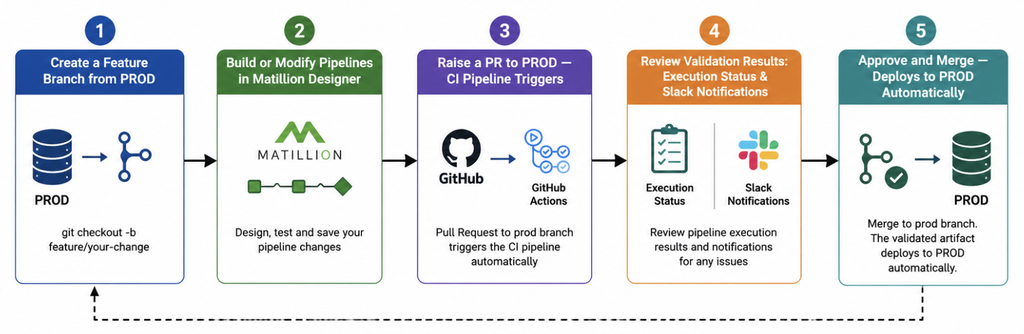
The CI/CD pipeline is broken down into 5 steps:
Why MAIA, and How It Was Used
Rather than writing every Python script and GitHub Actions workflow by hand, this project used MAIA as an active collaborator in the build process. Three things made that possible:
- Context-driven development. A single context file, .matillion/maia/rules/context.md, gave MAIA everything it needed to work consistently: project standards, environment details, workflow steps, and approval gates. Because that context persisted, MAIA didn’t need to be re-briefed on the CI/CD process in every conversation — it already understood the rules of the system it was building for.
- Custom skills. For the specific, reusable pieces of engineering logic — things like “how do you version and upload an artifact to the Matillion API” — purpose-built skill files taught MAIA the pattern once, so it could apply it consistently anywhere that logic was needed.
- Iterative, guided building. Each component — scripts, workflows, pipeline configs — was built through conversation with MAIA and validated step by step, rather than generated in one shot. The result: every Python script, every GitHub Actions YAML file, and every quality rule in the project was MAIA-generated, with a developer guiding architecture and validating output.
The MAIA Skills Behind the Pipeline
This is the heart of the system — here are specific skills that taught MAIA how to build it.
- create-artifact-api — Teaches MAIA how to authenticate against the Matillion API and package a pipeline release. It covers OAuth 2.0 client-credentials authentication, collecting the right set of files for an artifact, applying a version identifier, and performing the upload itself.
- commit-message — Generates structured, consistent commit messages that summarize exactly what changed in a pipeline release — new pipelines added, existing ones modified, and any that were deleted — so every commit tells a clear story of what shipped.
- slack-failure-notification — Provides a complete, reusable Slack notification job template for CI failures, including how to extract the relevant error details from a failed run and format them using Slack’s Block Kit for a readable, actionable alert.
- matillion-pipeline-execution-api — Covers everything involved in running a pipeline via the Matillion API programmatically: triggering execution, polling for status, filtering out child pipelines so only top-level parents are run, and the practical gotchas that come up when automating this.
- hardcoded-value-check — Guides MAIA to scan pipeline definitions for hardcoded database names, schema names, warehouse references, and inline SQL — enforcing the use of environment variables and defaults instead of literal values baked into a pipeline.
- Context file: .matillion/maia/rules/context.md — This isn’t a skill so much as the shared foundation all the skills operate against. It defines the environments in play, the stages of the workflow, versioning standards, required approval gates, the GitHub secrets configuration, and team roles — giving MAIA a single source of truth to reference on every task, rather than requiring repeated instructions.
Pipeline Architecture – What the Pipeline Actually Does
Let’s dive deeper into the pipeline and what is happening in each step:
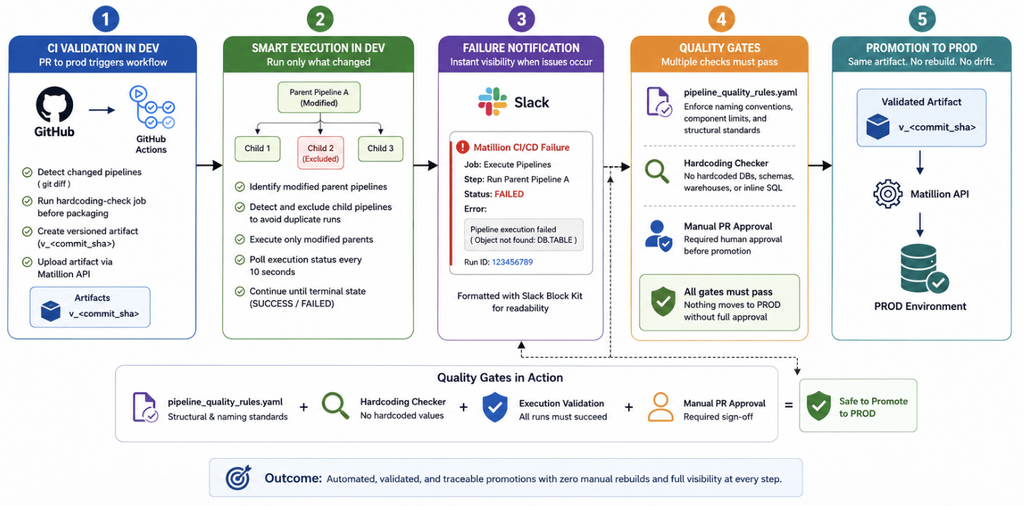
- Step 1: CI validation in dev — Every PR to prod triggers a GitHub Actions workflow. It automatically detects which pipelines changed via git diff, runs a dedicated hardcoding-check job before anything is packaged, then creates a versioned artifact (v_<commit_sha>) and uploads it via the Matillion API.
- Step 2: Smart execution — Rather than re-running everything, the workflow only executes modified parent pipelines — child pipelines referenced by them are automatically detected and excluded, avoiding duplicate runs. Execution status is polled every 10 seconds until the run reaches a terminal state.
- Step 3: Failure notification — If anything fails, a Slack message goes out with the specific failed job/step and error detail, formatted with Block Kit for readability.
- Step 4: Quality gates — A pipeline_quality_rules.yaml file enforces naming conventions, component limits, and structural standards. Combined with the hardcoding checker and a required manual PR approval, nothing reaches PROD without passing multiple checks.
- Step 5: Promotion — Once approved, the same artifact that was validated in dev is deployed to PROD — no rebuild, no drift.
Frequently Asked Questions
Summary
This article summarizes a fully automated CI/CD pipeline for Matillion Data Productivity Cloud using MAIA, GitHub Actions, Python, and the Matillion API to automate validation, testing, and promotion across environments while ensuring consistency and traceability.
Ready to modernize your Matillion deployment process? Connect with the CloudEQS team to explore how we can help automate and scale your data engineering workflows.

Comments are closed