


Overview
Snowflake migrations rarely fail because of a technical problem. They fail because of change management problems. The subject matter experts who built the legacy system have left the company, and the knowledge of how it really works left with them. Ownership, responsibilities, and testing strategies are never defined before kickoff, so gaps surface mid-project, when they cost the most to fix.
For CIOs, that means the biggest risks to cost, timeline, and business continuity are organizational, not technical. Our Snowflake Migration Framework is built to de-risk this across 3 phases with clear ownership, governance, and change management run through every phase, so you know who is accountable, how success is measured, and when the business can switch over with confidence.
Snowflake Migration Strategies: Lift & Shift vs. Lift & Optimize vs. Lift & Redesign.
Choosing the right Snowflake migration strategy depends on your business objectives, timeline, and modernization goals. Explore three approaches—Lift & Shift, Lift & Optimize, and Lift & Redesign—to balance migration speed, cost, performance, and long-term scalability.
| Criteria | Lift & Shift | Lift & Optimize | Lift & Redesign |
| What changes | Nothing; objects migrated as-is | Code only; no design or logic changes | Data models, schemas, and reports |
| Effort | Low | Medium | High |
| Timeline | Shortest | Medium | Longest |
| Relative cost | $$ | $$$ | $$$$$ |
| Testing | Lightest; no business testing | Slightly higher | Highest; business team involved |
| Best for | Hard deadlines, license or contract exits | Lowering run costs without disrupting the business | A platform built for future use cases and AI |
Lift & Shift
Data engineering objects move to Snowflake as-is, with no design changes. Reports keep running on the same final models.
- Pros: lowest risk, lowest cost, and fastest delivery. Testing effort is lighter, and because outputs match the legacy system apples-to-apples, no business testing is required.
- Cons: no code optimization. Performance and cost gains are left on the table, and existing technical debt comes with you.
Lift & Optimize
Design and business logic stay the same, but the code is optimized for better performance on Snowflake.
- Pros: moderate schedule risk with only slightly higher testing effort, plus opportunities to lower Snowflake costs and boost load performance.
- Cons: more testing and a longer timeline than a straight lift & shift.
Lift & Redesign
We assess every data engineering object, develop common data models and star schemas for reporting, and redesign reports to use those common models.
- Pros: an effective, reusable design and the most optimized platform, built to meet future business needs, including analytics and AI.
- Cons: the longest timeline and highest cost, and it requires business team involvement to define models and validate reports.
The CloudEQS Snowflake Migration Framework
The CloudEQS Snowflake Migration Framework provides a structured, three-phase approach to modernizing your data platform while minimizing risk and business disruption.
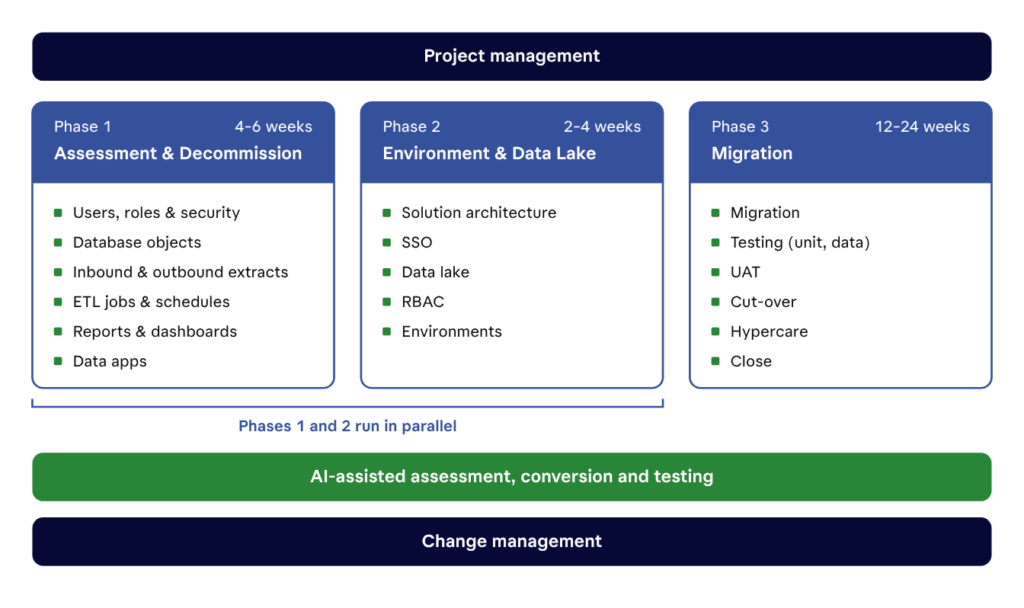
Phase 1: Assessment & Decommission
You can’t migrate what you haven’t inventoried. Phase 1 builds a complete picture of the legacy estate, decides what moves, and — just as important — decides what gets retired instead.
We assess six areas:
- Users, roles, and security — who has access to what today, and how that maps to Snowflake.
- Database objects — schemas, tables, views, functions, and stored procedures.
- Data extracts — every inbound and outbound feed, so no downstream consumer is surprised at cut-over.
- ETL jobs and schedules — what runs, when, in what order, and what depends on it.
- Reports and dashboards — which are used, which are duplicates, and which can be switched off.
- Data apps — applications that read from or write to the warehouse.
We use your approved AI provider to assisted with the assessment to scan code, catalog dependencies, and flag complexity at a speed manual review can’t match. The result is a scoped inventory with a recommended approach (shift, optimize, or redesign) for each workload, and a decommission list that shrinks the migration before it starts.
Typical length: 4–6 weeks, running in parallel with Phase 2.
Phase 2: Environment & Data Lake
Phase 2 builds the Snowflake foundation the migrated workloads will land on. Getting this right once avoids re-work, security gaps, and runaway costs later.
- Solution architecture — the target design for ingestion, storage, transformation, and consumption, aligned to the approach chosen in Phase 1.
- Single sign-on (SSO) — integration with your identity provider so users log in the way they already do.
- Data lake — a landing and raw layer for source data, structured so new sources can be added without redesign.
- Role-based access control (RBAC) — a role hierarchy that translates the security model from Phase 1 into Snowflake and scales as teams grow.
- Environments — separate development, test, and production environments with a clear promotion path.
By the end of Phase 2, you have a secure, governed Snowflake account that’s ready to receive data — before any workload is migrated into it.
Typical length: 2–4 weeks, running in parallel with Phase 1. Building the environment while the assessment is underway means Snowflake is ready the moment migration begins.
Phase 3: Migration
Phase 3 moves the workloads, proves they’re right, and switches the business over. It runs as a sequence of controlled steps:
- Migration — data, objects, and pipelines move to Snowflake using the approach set for each workload. We use Snowflake CoCo (formerly Cortex Code), Snowflake’s AI coding agent, to speed up converting legacy SQL and stored procedures to Snowflake.
- Testing — unit tests confirm each pipeline runs; data tests reconcile Snowflake output against the source (apples-to-apples for lift & shift and lift & optimize, against agreed business rules for redesigned workloads).
- User acceptance testing (UAT) — business users validate the reports and data they rely on before anything is switched off.
- Cut-over — a planned switch from legacy to Snowflake, with a rollback plan ready.
- Hypercare — a period of close support after go-live to resolve issues quickly while users settle in.
- Close — legacy systems are decommissioned, documentation is handed over, and the project is formally closed.
Typical length: 12–24 weeks, depending on complexity.
Why migrate with CloudEQS
CloudEQS is a Snowflake Premier partner, and our migration framework is built around owning the outcome, not just the hours.
- Outcome-based pricing — you pay for results, not open-ended effort.
- Delivery ownership — one team accountable from assessment to hypercare.
- Global delivery model — the right expertise at the right cost, around the clock.
Whether you need to hit a hard deadline with a lift & shift, cut run costs with a lift & optimize, build a platform for AI with a lift & redesign, or mix all three, we’ll help you choose the path and get there. Speak to our team today.

Comments are closed